📢 本文由 gemini-2.5-flash 翻譯
Elasticsearch 系列
Elasticsearch 的資料來自 MySQL 資料庫,因此當 MySQL 資料發生變動時,Elasticsearch 也必須跟著變動,這就是 Elasticsearch 與 MySQL 之間的資料同步。
常見的資料同步方案有三種:
同步呼叫
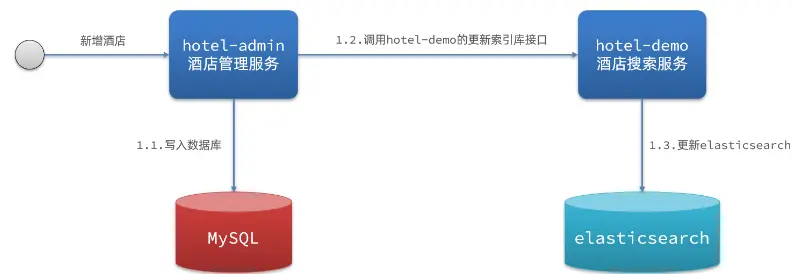
步驟:
- hotel-demo 對外提供介面,用於修改 Elasticsearch 中的資料
- 後台管理系統 (hotel-admin) 在完成資料庫操作後,直接呼叫 hotel-demo 提供的介面
非同步通知
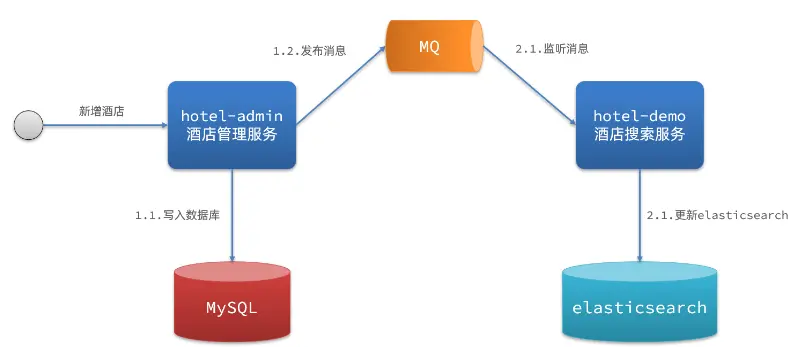
步驟:
- hotel-admin 對 MySQL 資料完成 CRUD 後發送 MQ 訊息
- hotel-demo 監聽 MQ,接收訊息後完成對 Elasticsearch 資料修改
監聽 binlog
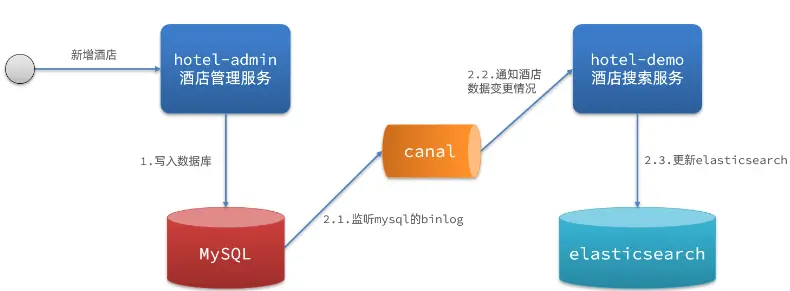
流程:
- 開啟 MySQL 的 binlog 功能
- MySQL 完成 CRUD 操作都會記錄在 binlog 中
- hotel-demo 基於 Canal 監聽 binlog 變化,即時更新 Elasticsearch 中的內容
方案比較
方式一:同步呼叫
方式二:非同步通知
- 優點:低耦合,實作難度一般
- 缺點:依賴 MQ 的可靠性
方式三:監聽 binlog
- 優點:完全解除服務間耦合
- 缺點:開啟 binlog 增加資料庫負擔、實作複雜度高
資料同步實作
說明:使用 MQ 非同步通知,在 hotel-admin 實作對 MySQL 的 CRUD 操作
在 hotel-admin、hotel-demo 引入 RabbitMQ 依賴
1
2
3
4
5
| <!--amqp-->
<dependency>
<groupId>org.springframework.boot</groupId>
<artifactId>spring-boot-starter-amqp</artifactId>
</dependency>
|
宣告佇列、交換機名稱
 1
 2
 3
 4
 5
 6
 7
 8
 9
10
11
12
| public class MqConstants {
// 交换机
public final static String HOTEL_EXCHANGE = "hotel.topic";
// 监听新增和修改队列
public final static String HOTEL_INSERT_QUEUE = "hotel.insert.queue";
// 监听删除的队列
public final static String HOTEL_DELETE_QUEUE = "hotel.delete.queue";
// 新增或修改的RoutingKey
public final static String HOTEL_INSERT_KEY = "hotel.insert";
// 删除的RoutingKey
public final static String HOTEL_DELETE_KEY = "hotel.delete";
}
|
在 hotel-demo 宣告交換機配置
 1
 2
 3
 4
 5
 6
 7
 8
 9
10
11
12
13
14
15
16
17
18
19
20
21
22
23
| @Configuration
public class MqConfig {
@Bean
public TopicExchange topicExchange(){
return new TopicExchange(MqConstants.HOTEL_EXCHANGE,true,false);
}
@Bean
public Queue insertQueue(){
return new Queue(MqConstants.HOTEL_INSERT_QUEUE,true);
}
@Bean
public Queue deleteQueue(){
return new Queue(MqConstants.HOTEL_DELETE_QUEUE, true);
}
@Bean
public Binding insertQueueBinding(){
return BindingBuilder.bind(insertQueue()).to(topicExchange()).with(MqConstants.HOTEL_INSERT_KEY);
}
@Bean
public Binding deleteQueueBinding(){
return BindingBuilder.bind(deleteQueue()).to(topicExchange()).with(MqConstants.HOTEL_DELETE_KEY);
}
}
|
在 hotel-admin 發送 MQ 訊息
 1
 2
 3
 4
 5
 6
 7
 8
 9
10
11
12
13
14
15
16
17
18
19
20
21
22
23
24
25
| public class HotelController {
@Autowired
private RabbitTemplate rabbitTemplate;
@PostMapping
public void saveHotel(@RequestBody Hotel hotel){
hotelService.save(hotel);
rabbitTemplate.convertAndSend(MqConstants.HOTEL_EXCHANGE, MqConstants.HOTEL_INSERT_KEY, hotel.getId());
}
@PutMapping()
public void updateById(@RequestBody Hotel hotel){
if (hotel.getId() == null) {
throw new InvalidParameterException("id 不能為空");
}
hotelService.updateById(hotel);
rabbitTemplate.convertAndSend(MqConstants.HOTEL_EXCHANGE, MqConstants.HOTEL_INSERT_KEY,hotel.getId());
}
@DeleteMapping("/{id}")
public void deleteById(@PathVariable("id") Long id) {
hotelService.removeById(id);
rabbitTemplate.convertAndSend(MqConstants.HOTEL_EXCHANGE, MqConstants.HOTEL_DELETE_KEY, id);
}
}
|
在 hotel-demo 接收 MQ 訊息,業務邏輯:
- 新增訊息:根據傳遞的 hotel.id 查詢資訊,然後新增一筆資料到索引庫
- 刪除訊息:根據傳遞的 hotel.id 刪除索引庫中的一筆資料
 1
 2
 3
 4
 5
 6
 7
 8
 9
10
11
12
13
14
15
16
17
18
19
20
21
22
23
24
25
26
27
28
29
30
| @Override
public void deleteById(Long id) {
try {
// 準備request
DeleteRequest request = new DeleteRequest("hotel", id.toString());
// 發送請求
client.delete(request, RequestOptions.DEFAULT);
} catch (IOException e) {
throw new RuntimeException(e);
}
}
@Override
public void insertById(Long id) {
try {
// 根據id查詢資料
Hotel hotel = getById(id);
// 轉換文件類型
HotelDoc hotelDoc = new HotelDoc(hotel);
// 準備request
IndexRequest request = new IndexRequest("hotel").id(id.toString());
// 準備 JSON
request.source(JSON.toJSONString(hotelDoc), XContentType.JSON);
// 發送請求
client.index(request, RequestOptions.DEFAULT);
} catch (IOException e) {
throw new RuntimeException(e);
}
}
|
在 hotel-demo 編寫監聽器
 1
 2
 3
 4
 5
 6
 7
 8
 9
10
11
12
13
14
15
16
17
18
19
20
21
22
23
| @Component
public class HotelLinster {
@Autowired
private IHotelService hotelService;
/**
* 監聽修改或新增
* @param id
*/
@RabbitListener(queues = MqConstants.HOTEL_INSERT_QUEUE)
public void listenHotelInsertOrUpdate(Long id){
hotelService.insertById(id);
}
/**
* 監聽刪除
* @param id
*/
@RabbitListener(queues = MqConstants.HOTEL_DELETE_QUEUE)
public void listenHotelDelete(Long id){
hotelService.deleteById(id);
}
}
|