Introduction
My previous database notes were a bit of a mess, so I’m rewriting them while reviewing the material (though this might still be a bit disorganized).
SQL Series
Database Learning 1: Introduction to Databases: This article Database Learning 2: Relational Model: https://blog.yexca.net/en/archives/87
Database Learning 3: SQL Language: https://blog.yexca.net/en/archives/88
Database Learning 4: Relational Database Theory: https://blog.yexca.net/en/archives/89
Database Learning 5: Normal Forms: https://blog.yexca.net/en/archives/90
Database Learning 6: Database Design: https://blog.yexca.net/en/archives/91
Database Learning 7: Database Control Functions: https://blog.yexca.net/en/archives/92
Four Basic Concepts of Databases
Data
Symbolic records that describe things.
Database
Broadly speaking, database data has three basic characteristics: permanent storage, organized, and shareable.
Strictly speaking, a database is a collection of organized, shareable, large-scale data stored long-term in a computer. Data is organized, described, and stored according to specific data models, featuring low redundancy, high data independence, easy scalability, and accessibility for various users.
Database Management System (DBMS)
A layer of data management software situated between the user and the operating system. Like an OS, it is fundamental computer software.
Key Functions:
- Data Definition
- Data Organization, Storage, and Management
- Data Manipulation
- Transaction Management and Operational Management
- Database Establishment and Maintenance
- Other functions (communication, data conversion, interoperability, etc.)
Database System (DBS)
A system that stores, manages, processes, and maintains data, consisting of the database, DBMS (and its development tools), applications, and the Database Administrator (DBA).
Evolution of Computer Data Management
- Manual Management Phase (Before the mid-1950s) Data is not saved, not shared, and lacks independence.
- File System Phase (Late 1950s to mid-1960s) Data can be saved, but sharing is poor, redundancy is high, and independence is low.
- Database System Phase (Starting from the late 1960s) The emergence of DBS shifted information systems from being “program-centric for data processing” to “shared database-centric,” achieving structuralization of overall data. High shareability, low redundancy, and easy expansion: Redundancy is significantly reduced, saving storage space while maintaining high data independence.
Classification of Data Models
Depending on the purpose, models are divided into two levels. Models abstracted from the information world are called Conceptual Data Models. Models abstracted from the computer world supported by a DBMS are called Structural Data Models (or simply Data Models).
Conceptual Data Model (Conceptual Model)
This model is independent of computer systems and doesn’t involve how information is represented in a system. It describes the information structure for a specific organization from a user perspective. It’s used for modeling the information world, typically using the Entity-Relationship (E-R) method. It’s primarily used in database design.
Common terms:
- Entity: An object that exists objectively and can be distinguished from others.
- Attribute: A characteristic describing an entity.
- Key: A set of attributes that uniquely identifies an entity.
- Entity Type: An abstraction of similar entities using the entity name and its attributes.
- Entity Set: A collection of entities of the same type.
- Domain: The range of possible values for an attribute.
- Relationship: The correspondence between entities.
Three types of relationships:
- One-to-One (1:1)
- One-to-Many (1:N)
- Many-to-Many (M:N)
The conceptual model represented by the E-R method is called an E-R Diagram. Entities use rectangles, attributes use ovals, connected to entities by undirected edges.
Structural Data Model (Logical Model)
This model directly addresses the logical structure of a database. Every DBMS is based on a specific structural model. It’s primarily used for DBMS implementation.
Main models include: Hierarchical, Network, Relational, and Object-Oriented.
- Hierarchical Model Uses a “tree structure” to represent relationships. The data structure is a “directed tree.”
- Network Model Uses a “graph structure” to represent relationships.
- Relational Model Uses a two-dimensional table structure to represent entities and their relationships. Each table consists of rows and columns and is called a “relation.” A relation schema describes the relation. A relational model is a collection of relation schemas.
Physical Model
The lowest level of abstraction. It describes how data is represented and accessed internally within the system, or how it is stored and accessed on disks or tapes. It is oriented towards the computer system.
Database System Architecture
While database products vary, most share a common architecture: “Three-level Schema and Two-level Mapping.”
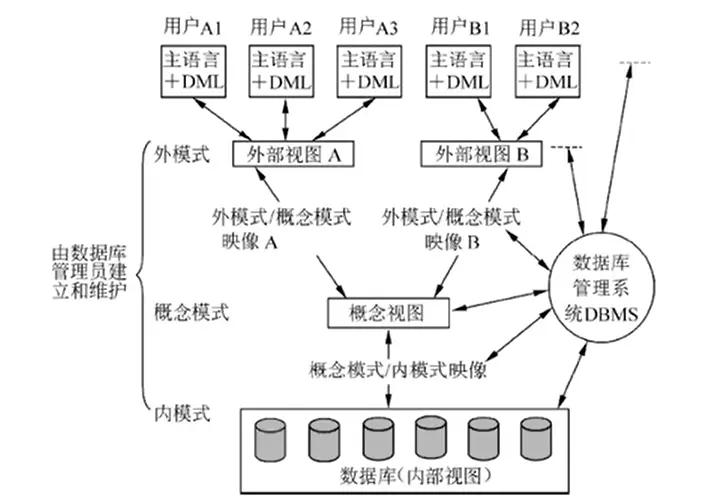
Three-level Schema
- Conceptual Schema (Base Tables) Also called the logic schema. It’s the description of the logical structure and characteristics of all data in the database—the common view for all users.
- External Schema (Views) Also called the user schema or sub-schema. It’s the interface between the user and the DBS, describing only the part of the data the user needs.
- Internal Schema (Storage Files) Also called the storage schema. A database has only one internal schema. It describes the physical structure and storage method—how data is organized inside the database.
Two-level Mapping
DBS provides two mappings between the three schemas: Schema/Internal Mapping and External/Schema Mapping. These mappings ensure high logical and physical independence.
- Schema/Internal Mapping (Storage) Exists between the conceptual and internal levels. It handles the transformation between the conceptual schema and the internal schema. When the storage structure changes, the DBA updates this mapping so the conceptual schema remains unchanged. This ensures physical independence for applications.
- External/Schema Mapping (Views) Exists between the external and conceptual levels. It handles the transformation between external schemas and the conceptual schema. When the conceptual schema changes, the DBA updates the mappings so the external schemas remain unchanged. This ensures logical independence for applications.
Data independence means separating the data definition from the program. This is guaranteed by the DBMS’s two-level mapping functions.
- Physical Independence: User applications are independent of the physical storage of data.
- Logical Independence: User applications are independent of the logical structure of the database.
This independence allows data definitions to be separated from apps. Since the DBMS manages data access, application development is simplified, reducing maintenance and modification costs.
Components of a Database System
- Hardware Platform and Database Sufficient RAM, disks/arrays, and high I/O throughput for data transfer.
- Software DBMS, the OS supporting it, high-level languages with database interfaces and their compilers, dev tools, and the specific database application systems.
- Personnel DBAs, systems analysts, database designers, application programmers, and end-users.
DBA Responsibilities: Deciding data content and structure, deciding storage structure and access strategies, defining security and integrity constraints, monitoring usage and performance, and handling database improvement, reorganization, and restructuring.