This article was written by Hiyoung
1. SQL ORDER BY Keyword
The ORDER BY keyword is used to sort the result set by one or more columns.
By default, ORDER BY sorts records in ascending order. To sort records in descending order, use the DESC keyword.
SQL ORDER BY Syntax
| |
– ASC stands for ascending, DESC stands for descending.
– The ORDER BY clause should be placed at the end of the script. When sorting multiple columns, the database sorts by column_name1 first, then column_name2, and so on.
2. Deleting All Data (DELETE and DROP TABLE)
You can delete all rows in a table without deleting the table itself. This keeps the table structure, attributes, and indexes intact: DELETE FROM table_name;
Or:
DELETE * FROM table_name;
Note: Be extremely careful when deleting records! You can’t undo this action.
DROP TABLE Statement
The DROP TABLE statement is used to delete a table entirely: DROP TABLE table_name
Note: Unlike DELETE, DROP TABLE removes both the table data and the structure. This is also irreversible.
DROP DATABASE Statement
The DROP DATABASE statement is used to delete a database: DROP DATABASE database_name
TRUNCATE TABLE Statement
If you only need to wipe the data inside a table but keep the table itself, use the TRUNCATE TABLE statement: TRUNCATE TABLE table_name
3. SQL JOIN
SQL JOINs are used to combine rows from two or more tables.
The image below illustrates 7 common usages related to LEFT JOIN, RIGHT JOIN, INNER JOIN, and OUTER JOIN.
- INNER JOIN: Returns rows if there is at least one match in both tables (INNER JOIN is the same as JOIN).
- LEFT JOIN: Returns all rows from the left table, even if there are no matches in the right table.
- RIGHT JOIN: Returns all rows from the right table, even if there are no matches in the left table.
- FULL JOIN: Returns rows if there is a match in either of the tables.
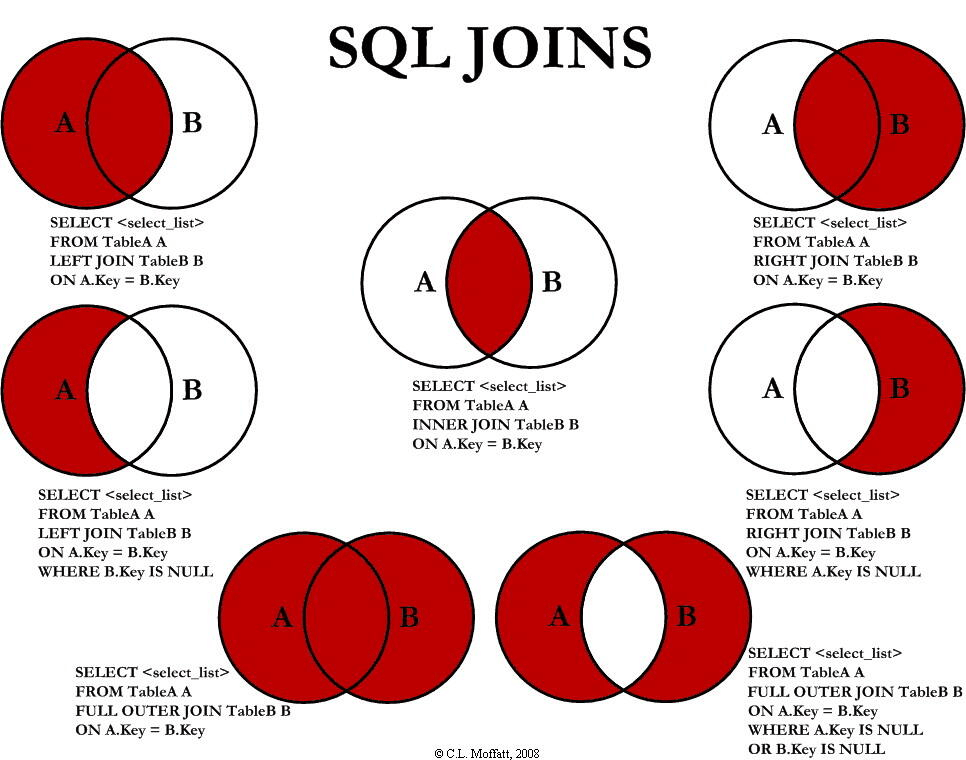
Note: Join statements in SQL correspond to the connection concepts in database theory. LEFT JOIN, RIGHT JOIN, and INNER JOIN correspond to natural joins, while FULL JOIN corresponds to a Cartesian product.
4. SQL Constraints
| |
- NOT NULL – Ensures a column cannot store
NULLvalues. - UNIQUE – Ensures every row in a column has a unique value. (A table can have multiple
UNIQUEconstraints but only onePRIMARY KEY;PRIMARY KEYautomatically includes aUNIQUEconstraint). - PRIMARY KEY – A combination of
NOT NULLandUNIQUE. Uniquely identifies each record in a table. Helps in finding specific records faster. - FOREIGN KEY – Ensures referential integrity by matching data in one table to values in another.
- CHECK – Ensures the values in a column meet specific conditions.
- DEFAULT – Sets a default value for a column when no value is specified.
5. AUTO INCREMENT Field
Usually, we want the primary key value to be created automatically every time a new record is inserted.
In SQL Server, we use the IDENTITY field to achieve this.
The following SQL defines the “ID” column in the “Persons” table as an auto-increment primary key:
| |
In this example, the starting value for IDENTITY is 1, and it increments by 1 for each new record.
Tip: To start the “ID” column at 10 and increment by 5, change it to IDENTITY(10,5).
When inserting into the “Persons” table, you don’t need to specify a value for the “ID” column (it’s added automatically):
| |
The SQL above inserts a new record where “ID” gets a unique auto-generated value, “FirstName” is “Lars”, and “LastName” is “Monsen”.
6. Triggers
See: SqlServer Basics (Triggers) – wangchuang2017 – Blog Garden