Introduction
After learning
how to use Markdown
, I’ve found it incredibly useful (all my recent posts are written in Markdown). Since I often work with Markdown for coding or
building GitHub Pages
, and VS Code is my go-to editor (for watching Diana), I looked for a way to enable real-time previews.
Shortcuts
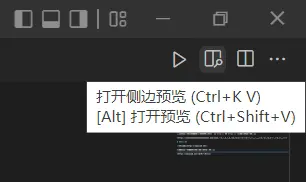
Inside a Markdown file (.md), click into the editor window to focus it, then press CTRL+K followed by V. Note: make sure you’re using an English input method.
The method above opens a side-by-side preview. You can also press CTRL+Shift+V to open the preview in a full-sized tab.
Toolbar Button
In the top right corner of the Markdown editor, there is an “Open Preview to the Side” button. Just click it.
Command Palette
Press CTRL+Shift+P to open the Command Palette, then type markdown to see the available commands.
References
Writing and Real-time Previewing Markdown in Visual Studio Code