📢 This article was translated by gemini-3-flash-preview
This article was written by Hiyoung
- Linux won’t automatically create non-existent folders. When using the
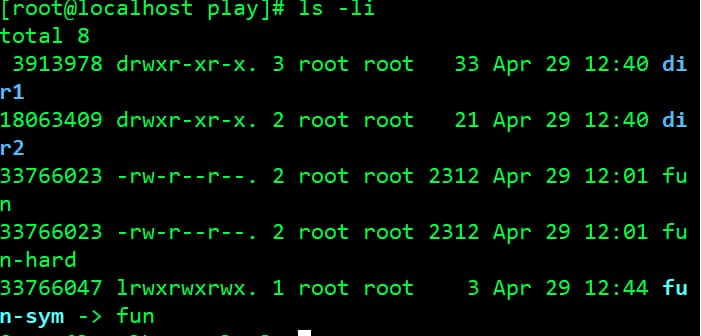
mvcommand, make sure the destination directory exists, or it will simply rename the file. - Creating a hard link is essentially giving a file an additional name (the data itself remains unchanged). It’s similar to creating a pointer to that file in C.
- Symbolic links are like shortcuts in Windows. You can clearly see the difference using the
ls -licommand. Hard links have the same byte count as the source file, while symbolic links do not.
- Creating commands with
alias: Use;to run multiple commands on the same line. Usetypeto check if a command already exists in the system. Note that aliases created this way disappear when the shell session ends (since they aren’t saved to a file). Useunaliasto remove an alias. - Using
>redirects and overwrites the target file, while>>appends to it. - To write error messages to a file instead of displaying them on the screen, use
2>. - There are two ways to redirect both standard output (stdout) and standard error (stderr) to the same file: first, add
2>&1after the filename; second, use&>as the redirection operator.
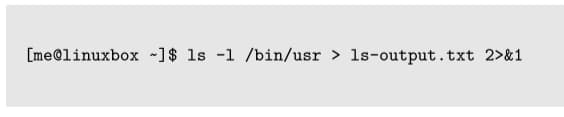
Method 1 (Works in older shell versions)

Method 2