This article was written by Hiyoung
Chapter 1: Understanding Web and Network Basics
1.1 Introduction
To understand HTTP, you should first know about the TCP/IP protocol suite. The networks we typically use (including the internet) operate based on the TCP/IP suite, and HTTP is a subset of it. For devices on the internet to communicate, they must follow common rules, which we call protocols. (TCP/IP is a general term for various internet-related protocol families, including but not limited to: PPPoE, HTTP, TCP, IP, UDP, IEEE 802.3, etc.)
The TCP/IP protocol suite is structured in layers, from top to bottom: Application Layer, Transport Layer, Network Layer, Data Link Layer.
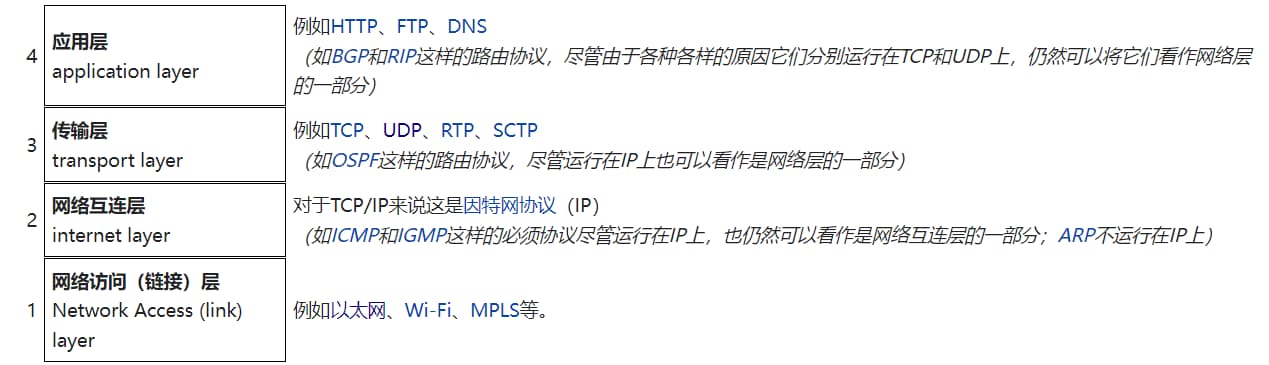 Internet protocol suite - Wikipedia
When communicating using the TCP/IP protocol suite, the client moves down from the Application Layer, and the server moves up from the Data Link Layer. As the client transmits data between layers, each layer adds its header information. Conversely, the server removes headers layer by layer. This method of wrapping data is called encapsulation.
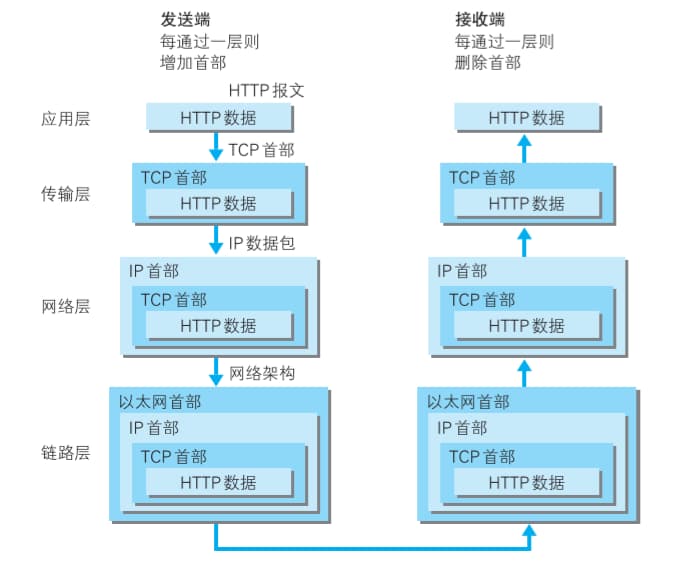
1.2 IP, TCP, and DNS
1.2.1 IP Protocol
The IP protocol operates at the Network Layer. The “IP” in TCP/IP refers to the IP protocol itself, not an IP address. The IP protocol’s job is to send various data packets to their destination. Different IP addresses can be paired with MAC addresses. While IP addresses can change, MAC addresses generally do not. An IP address specifies the address assigned to a node, while a MAC address is the fixed address belonging to a network interface card (NIC).
1.2.2 MAC Address
Communication between IPs relies on MAC addresses. Typically, the ARP protocol is used to find the corresponding MAC address for a given IP address.
1.2.3 TCP Protocol
Layer-wise, TCP is in the Transport Layer, providing a Byte Stream Service. This means it manages large chunks of data by splitting them into smaller segments for easier transmission. In short, TCP segments data to make large transfers simpler and can also confirm if data successfully reached the other party.
To confirm data delivery, TCP uses a three-way handshake. This handshake uses TCP flags: SYN (synchronize) and ACK (acknowledgement).
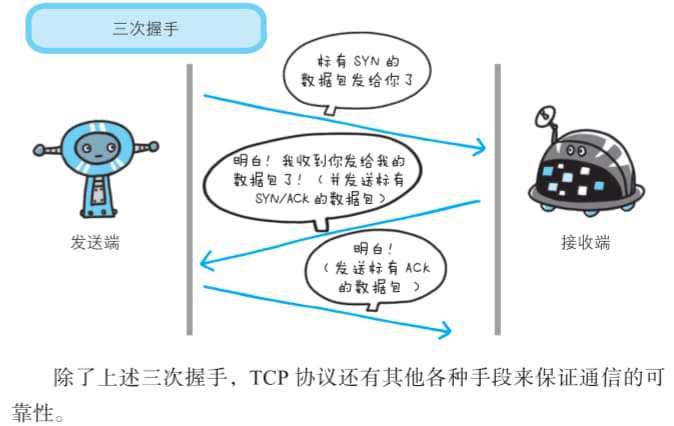
1.2.4 DNS Service for Domain Name Resolution
Computers can be assigned both IP addresses and hostnames/domain names. The DNS protocol provides services to look up IP addresses from domain names, or vice-versa, to find domain names from IP addresses.
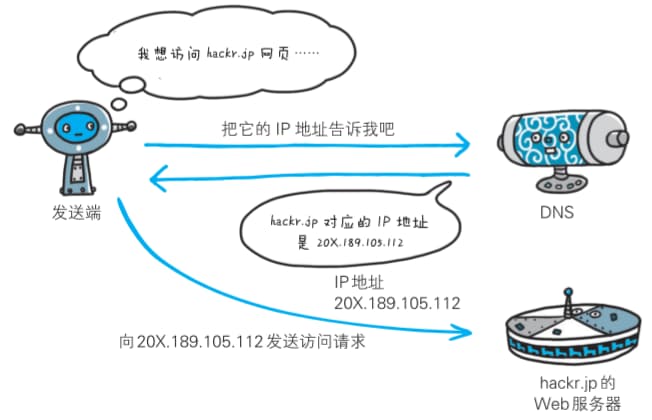
1.3 URL and URI
1.3.1 Differences and Relationship
Compared to URI (Uniform Resource Identifier), we’re more familiar with URL (Uniform Resource Locator). URLs are what you type into a web browser to access web pages, like https://www.bilibili.com/ . A URI identifies a resource on the internet using a string, while a URL indicates the resource’s location (its address on the internet). So, a URL is a subset of a URI. A URI can be a locator (URL), a name (URN), or both. A Uniform Resource Name (URN) is like a person’s name, while a Uniform Resource Locator (URL) is like their address. In other words, a URN defines what something is, and a URL provides how to find it.
1.3.2 URI Format
To represent a specific URI, you can use an absolute URI, absolute URL, or relative URL, all of which contain the necessary information.
A relative URL is specified from the browser’s base URI, for example, /image/logo.gif.
Absolute URI format:
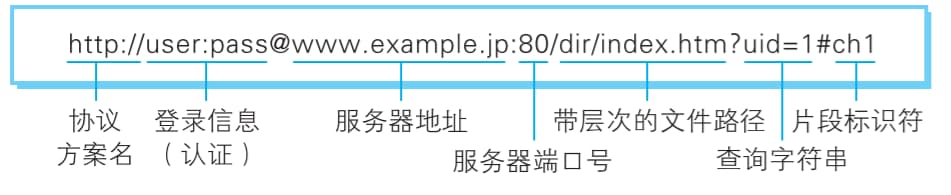
Login Info (Authentication): Specifies a username and password for authentication when retrieving resources from the server. This is optional.
Server Address: When using an absolute URI, you must specify the server address to access. This can be a DNS-resolvable name like hackr.jp, an IPv4 address like 192.168.1.1, or an IPv6 address enclosed in square brackets, such as [0:0:0:0:0:0:0:1].
Server Port Number: Specifies the network port number for connecting to the server. This is also optional; if omitted, the default port is used automatically.
Hierarchical File Path: Specifies the file path on the server to locate the specific resource. This is similar to the directory structure in UNIX systems.
Query String: For resources within the specified file path, you can pass arbitrary parameters using a query string. This is optional.
Fragment Identifier: A fragment identifier typically marks a sub-resource within the retrieved resource (a specific location within a document). However, its usage is not explicitly defined in RFCs . This is also optional.
Chapter 2: The Simple HTTP Protocol
2.1 HTTP Introduction
HTTP is a stateless protocol. This means the HTTP protocol itself doesn’t save the communication state between each request and response. So, cookie technology was introduced to maintain state. (Note: This HTTP book was published earlier. Current state management technologies are achieved through a combination of cookies, sessions, and tokens .)
2.2 Common HTTP Methods
GET: Retrieve resources
The GET method is used to request the resource specified by the URL. The server processes the specified resource and returns the response content.
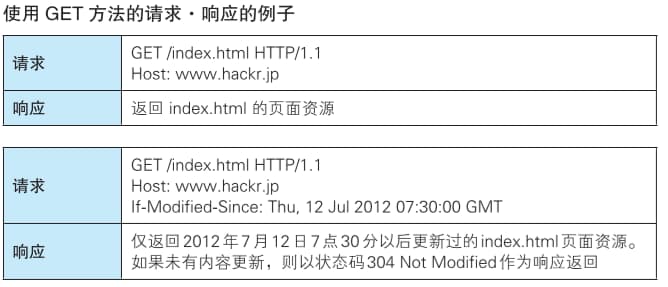
POST: Transmit entity body
POST is used to send data to the server. It’s also employed when the data to be transmitted (e.g., in a request body) is too large.
Differences between GET and POST:
Let’s cut to the chase: there’s no fundamental difference between GET and POST methods; it’s mostly about message format.
Request Parameter Length Limit: GET requests are typically limited to ~1024KB (browser/server dependent), while POST has no inherent limit on request data. Request Parameters: GET request parameters are passed via the URL, with multiple parameters joined by ‘&’. POST request parameters are placed in the request body. Request Caching: GET requests can be cached, while POST requests are not, unless manually configured. Security: POST is considered more secure than GET. GET requests are harmless on browser back, but POST may re-submit the request. History: GET request parameters are fully retained in browser history, while POST parameters are not. Encoding: GET requests only support URL encoding, while POST supports various encoding types. Parameter Data Types: GET typically only accepts ASCII characters (after URL encoding), while POST has no such restriction.
Additionally, HTTP includes other methods like PUT, HEAD, and DELETE , which we won’t detail here.
2.3 HTTP Persistent Connections (Three-way Handshake, Four-way Wave)
The characteristic of persistent connections is that the TCP connection remains active as long as neither end explicitly requests to close it.
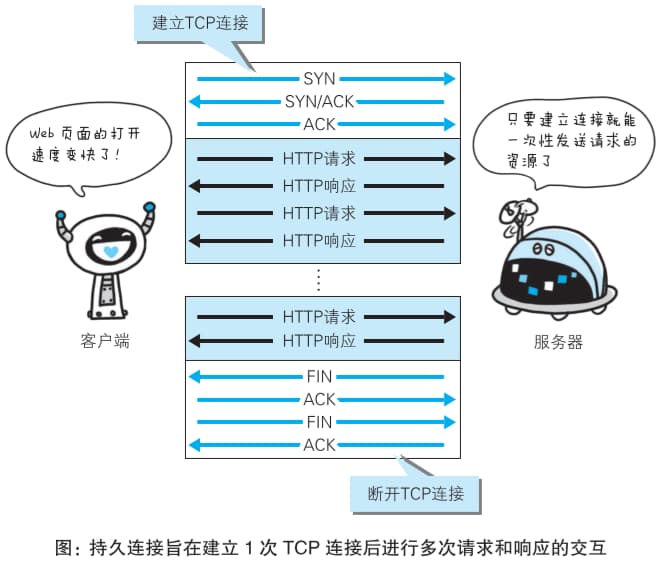
Three-way handshake: Establishes TCP connection. Four-way wave: Terminates TCP connection.
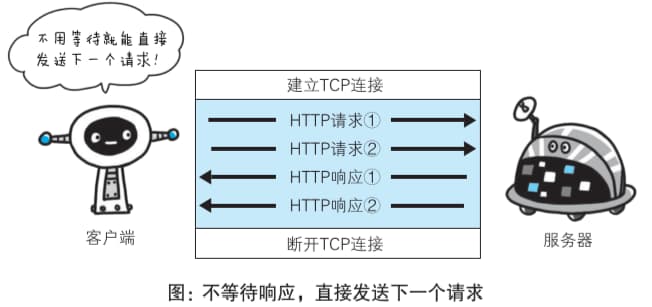
With persistent connections, pipelining allows sending the next request without waiting for the previous response.
2.4 State Management with Cookies
Cookies instruct the client to save a Cookie based on the ‘Set-Cookie’ header field information sent in the server’s response. The next time the client sends a request to that server, it automatically includes the Cookie value in the request message.

Cookie information is generated by the server and sent to the client for storage.
Chapter 3: HTTP Message Information
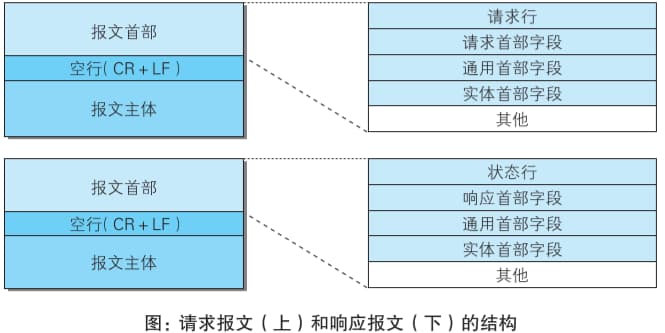
3.1 HTTP Request and Response Message Structure
Information exchanged using the HTTP protocol is called an HTTP message. HTTP messages from the requesting party (client) are called request messages, and those from the responding party (server) are called response messages. They consist of an 8-bit byte stream and are transmitted via HTTP communication.
Request Line: Contains the request method, request URI, and HTTP version.
Status Line: Contains the status code indicating the response result, a reason phrase, and the HTTP version.
Header Fields: Contain various headers representing conditions and attributes of the request and response. Generally, there are four types of headers: General Headers, Request Headers, Response Headers, and Entity Headers.
Other: May include headers not defined in HTTP RFCs (e.g., Cookie).
3.2 Encoded and Chunked Transfer
HTTP uses encoding during data transmission to improve transfer speed.
3.2.1 Differences Between Message Body and Entity Body
Entity: Transmitted as payload data (supplementary item) in a request or response, its content consists of an entity header and an entity body.
The HTTP message body is used to transmit the request or response entity body. Typically, the message body equals the entity body. A difference between them only arises when encoding operations modify the entity body’s content during transmission.
3.2.2 Chunking Entity Bodies for Transfer
When transferring large amounts of data in HTTP communication, splitting the data into multiple chunks allows browsers to display pages progressively. This feature of chunking the entity body is called chunked transfer encoding. Chunked transfer encoding divides the entity body into multiple chunks. Each chunk is marked with its size in hexadecimal, and the last chunk of the entity body is marked with “0(CR+LF)”.
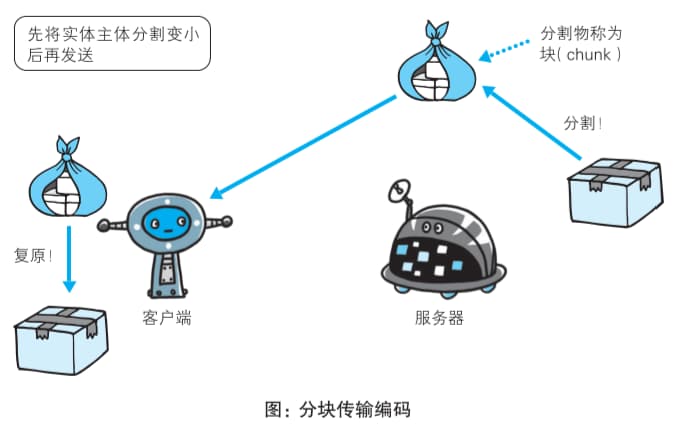
These “chunks” are also commonly referred to as “packets”.
Chapter 4: HTTP Status Codes for Return Results
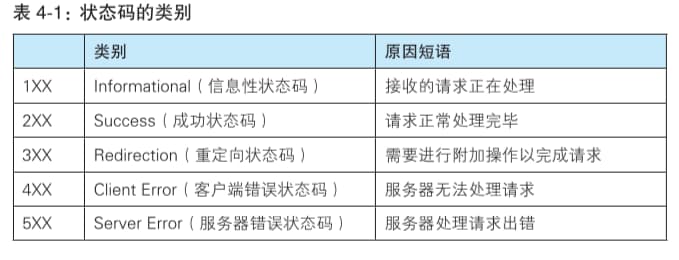
4.1 Status Code Categories
Status codes let users know if the server processed the request successfully. There are many types, but only about 14 are commonly used.
4.2 2XX Success
4.2.1 200 OK
Indicates that the client’s request was successfully processed by the server. The information returned with the status code in the response message varies depending on the method used.
4.2.2 204 No Content
This status code means the server successfully processed the request, but the returned response message contains no entity body.
4.3 3XX Redirection
We’ll focus on 301 and 302 redirects. Other status codes can be looked up independently.
4.3.1 301 Moved Permanently
A 301 redirect is a permanent redirection. This status code indicates that the requested resource has been assigned a new URI, and future requests should use the URI now pointing to that resource. For example, if you forget to add a trailing slash “/” to a resource path like the one below, a 301 status code might be generated.
http://excample.com/sample
4.3.2 302 Found
A 302 redirect is a temporary redirection. This status code indicates that the requested resource has been assigned a new URI, and the client (for this time) is expected to access it using the new URI. Similar to 301 Moved Permanently, but 302 signifies a temporary move, not a permanent one.
4.4 4XX Client Errors
These include 400 Bad Request, 401 Unauthorized, 403 Forbidden, and 404 Not Found. We’ll focus on 404 Not Found.
4.4.1 404 Not Found
This status code indicates that the requested resource could not be found on the server. It can also be used by the server to deny a request without specifying a reason.
4.5 5XX Server Errors
5XX responses indicate an error occurred on the server itself.
Chapter 5: Web Servers
5.1 Communication Data Forwarding: Proxies, Gateways, Tunnels
5.1.1 Proxy
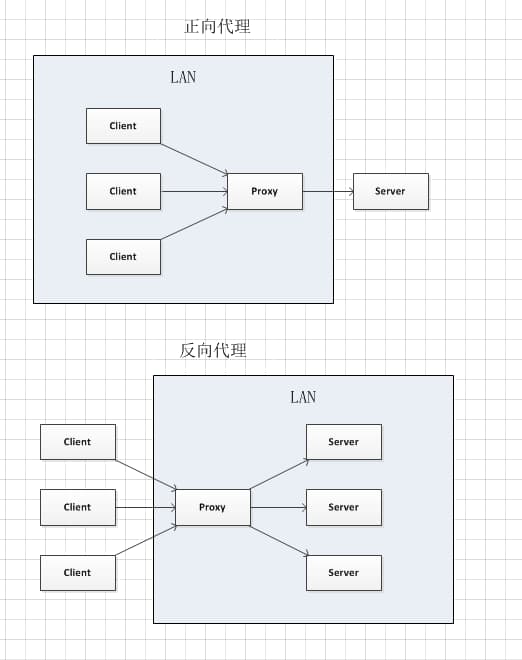
A proxy server’s basic function is to receive a client’s request and forward it to another server. Proxies don’t alter the request URI; they send it directly to the upstream target server holding the resource. It’s worth noting that “proxy” usually refers to a client-side proxy (also called a forward proxy), while a reverse proxy acts on behalf of the server.
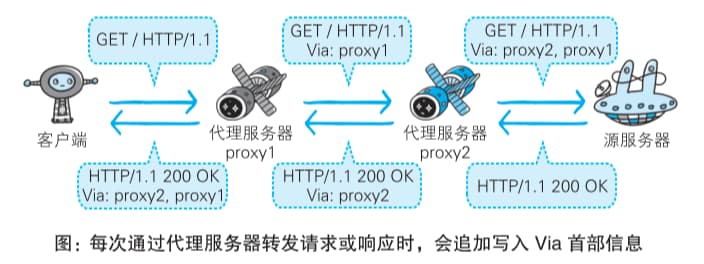
Using a proxy server can reduce network bandwidth by leveraging caching, and sometimes proxies are used for information security.
- Caching Proxy
When forwarding responses, a Caching Proxy saves a copy (cache) of the resource on the proxy server beforehand. When the proxy receives another request for the same resource, it can return the cached resource as a response instead of fetching it from the origin server.
- Reverse Proxy
Reverse proxies offer many benefits:
Hides the IP address of the server (cluster) from clients. Security: Acts as an application layer firewall , providing protection against web-based attacks (e.g., DoS / DDoS ) and making it easier to identify malware , etc. Uniformly provides encryption and SSL acceleration for backend servers (clusters) (e.g., SSL termination proxy). Load balancing : If a server in the cluster is heavily loaded, the reverse proxy uses URL rewriting to retrieve the requested resource from a less-loaded server or a backup. Provides caching services for static content and dynamic content with high access requests in a short period. Performs compression on some content to save bandwidth or provide service to networks with poor bandwidth.
5.1.2 Gateway
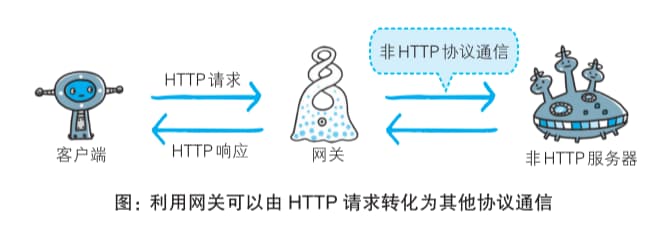
Gateways operate very similarly to proxies. However, a gateway enables servers on the communication path to provide services using non-HTTP protocols.