You can tell from the image links these are my 2023-04 notes. I hadn’t posted them because they’re mostly just raw knowledge points, not a polished article. But they’re notes nonetheless, and it’s handy to have them on the blog for quick reference.
1. Network Devices
| Layer | Device | Isolates Broadcast Domain | Isolates Collision Domain |
|---|---|---|---|
| Physical Layer | Repeater / Hub | ✗ | ✗ |
| Data Link Layer | Bridge / Switch | ✗ | ✓ |
| Network Layer | Router | ✓ | ✓ |
Physical Layer Interconnection Devices
Physical layer interconnection devices include Repeaters and Hubs.
Repeater
It interconnects LAN segments at the physical layer, used to extend the length of LAN segments.
Hub
A hub can be seen as a special multi-port repeater, also capable of signal amplification.
Data Link Layer Interconnection Devices
Data link layer interconnection devices include Bridges and Switches.
Bridge
A bridge connects two LAN segments.
Switch
A switch is essentially a multi-port bridge.
Network Layer Interconnection Devices
A Router is a network layer interconnection device, used to connect multiple logically separate networks.
Application Layer Interconnection Devices
A Gateway is an application layer interconnection device. When connecting networks of different types with significant protocol differences, a gateway is required.
2. Protocol Suites
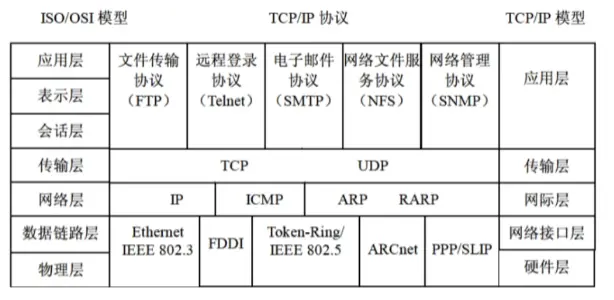
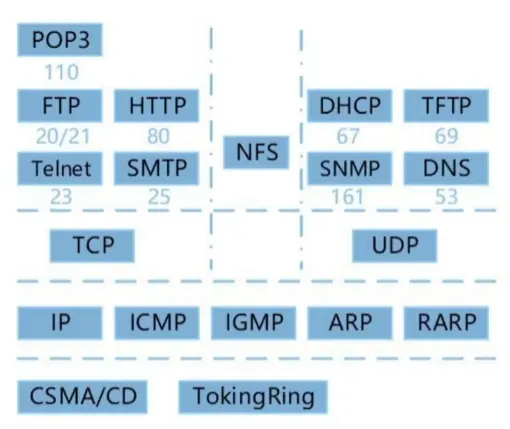
The TCP/IP protocol suite for computer networks.
3. TCP and UDP
Internet Layer Protocol: IP
The Internet Layer (Network Layer) is central to the entire TCP/IP suite. Besides IP, other key protocols defined here include ICMP, ARP, and RARP.
IP’s service is generally considered connectionless and unreliable. However, under good network conditions, IP-transmitted data can reach its destination intact.
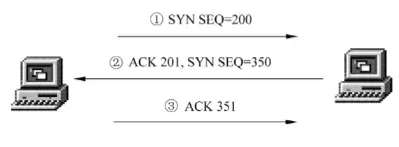
Connectionless transmission means sending data without confirming the destination system is ready to receive it. In contrast, connection-oriented transmission (like TCP) requires a three-way handshake between source and destination before application-layer data transfer.
As for unreliable service, it means the destination system doesn’t acknowledge successfully received packets. IP just tries its best to deliver data. If reliability is needed, higher-layer protocols must implement additional services to ensure successful packet delivery.
Since IP only offers connectionless, unreliable service, error detection and flow control are delegated to other layers. This is a key reason for TCP/IP’s efficiency.
Transport Layer Protocol: TCP
TCP (Transmission Control Protocol) is one of the most important protocols in the TCP/IP suite. Building on IP’s unreliable data service, it provides applications with a reliable, connection-oriented, full-duplex data transfer service.
Reliable transmission, connection management, error checking and retransmission, flow control, congestion control, port addressing.
Flow control, in particular, uses a variable-size sliding window protocol.
Both establishing and closing a TCP connection between source and destination hosts require a three-way handshake to confirm success.
Transport Layer Protocol: UDP
User Datagram Protocol (UDP) is an unreliable, connectionless protocol that enables communication between application processes. Compared to TCP, also in the transport layer, UDP is connectionless and has much weaker error detection. Simply put, TCP helps provide reliability, while UDP boosts transmission speed. For example, applications requiring interactive sessions (like FTP) often use TCP, while those performing their own error detection or needing none (like DNS, SNMP) typically use UDP.
The primary role of UDP protocol software is to present UDP messages to the application layer. It does not retransmit lost or erroneous data messages, reorder out-of-sequence IP datagrams, eliminate duplicate IP datagrams, acknowledge received datagrams, or establish/terminate connections. These concerns are handled by the applications using UDP for communication.
While TCP provides reliable data transfer, it does so at the cost of overhead. This means TCP requires more time and traffic to accomplish the same task. Sacrificing some time for network reliability is acceptable when the network is unreliable. However, in highly reliable networks, UDP can be used to minimize traffic waste.
4. SMTP and POP3
Email is an electronic medium for information exchange using computers. It emerged with computer networks, relying on network communication to transmit mail. It’s one of the most widely used services.
Email systems operate on a client/server model. Email servers primarily use SMTP (Simple Mail Transfer Protocol). This protocol defines email message format and delivery methods, ensuring correct addressing and reliable transmission. As a text-oriented network protocol, its limitation is the inability to transmit non-ASCII text and non-text attachments, which becomes more apparent in the growing multimedia environment and concerns over email privacy.
Later protocols, including MIME (Multipurpose Internet Mail Extensions) and PEM (Privacy-Enhanced Mail), addressed SMTP’s shortcomings. SMTP is used in large multi-user, multi-tasking operating systems, making it difficult to receive mail on PCs. Therefore, most mail management programs on TCP/IP networks use SMTP for sending mail and POP (Post Office Protocol, commonly POP3) to store mail not yet retrieved by users.
POP has two versions: POP2 and POP3. Currently, POP3 can be used with SMTP or independently for sending and receiving emails. POP is a simple, plain-text protocol; each transfer handles an entire email, without partial transfers.
Both SMTP and POP3 (for receiving mail) use TCP ports. SMTP uses port 25, and POP3 uses port 110.
5. ARP, RARP, and DHCP
ARP and RARP
Address Resolution Protocol (ARP) and Reverse Address Resolution Protocol (RARP) are other important protocols residing in the Internet Layer (Network Layer). ARP translates IP addresses to physical addresses, while RARP translates physical addresses to IP addresses.
Every network device – hosts, routers, switches, etc. – has a unique physical address, provided by its network card. Each NIC has a distinct ID from the factory, meaning a unique physical address. On the other hand, to abstract away underlying protocols and physical address differences, the IP protocol uses IP addresses. Thus, IP and physical addresses must be inter-converted during data transmission.
The process for IP-to-physical address conversion using ARP is: When a computer needs to communicate with another, it first checks its ARP cache. If the IP address is found, it uses the corresponding physical address to directly send the datagram to the target NIC. If the ARP cache doesn’t contain the IP address, ARP sends an ARP request packet as a broadcast on the LAN.
If a computer on the LAN matches the requested IP address, it generates an ARP reply containing its physical address. The ARP protocol software then adds this IP-to-physical address mapping to its cache, and data communication can begin.
DHCP
DHCP (Dynamic Host Configuration Protocol) centralizes IP address management and allocation, allowing hosts in a network environment to dynamically obtain IP addresses, Gateway addresses, DNS server addresses, and other information, while also improving address utilization.
A DHCP client can obtain its own IP address, DNS server address, DHCP server address, and default gateway address from a DHCP server.
Windows invalid address: 169.254.x.x
Linux invalid address: 0.0.0.0
169.254.x.x is the IP address Windows automatically assigns to a client when DHCP lease acquisition fails.
6. IP Addresses and Subnet Masks
IP Addresses
Internet addresses are described by names, making them easy to understand and remember. However, hosts on the Internet are uniquely identified by IP addresses. This is because the Internet uses the TCP/IP protocol, so every host must have an IP address.
Each IP address consists of four numbers less than 256, separated by dots. An Internet IP address is 32 bits, or 4 bytes long. It has two formats: binary and decimal. Binary is what computers understand, while decimal is ’translated’ from binary for easier human use and comprehension. For example, the decimal IP address 129.102.4.11 is equivalent to the binary 10000001 01100110 00000100 00001011. Clearly, the dotted-decimal format is much more convenient.
Domain names and IP addresses have a one-to-one mapping. Domain names are easier to remember and use, hence their widespread adoption. When a user exchanges information with a computer on the Internet, they only need to use the domain name; the network automatically converts it to an IP address to locate that computer.
Internet addresses are categorized into 5 classes: Class A, Class B, Class C, Class D, and Class E. In an IP address, all zeros represent the network, and all ones represent a broadcast.
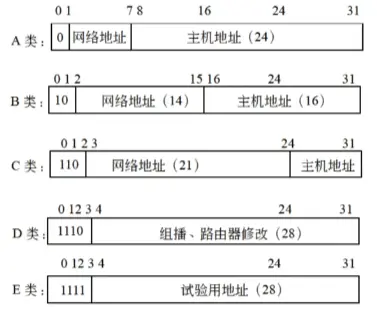
Class A network addresses use 1 byte (8 bits), with the highest bit set to 0 to identify this class. The remaining 7 bits form the actual network address, supporting 1 to 126 networks. The subsequent 3 bytes (24 bits) are for host addresses, providing addressing for $2^{24}-2$ endpoints.
The first octet of a Class A network address ranges from 000 to 127 in decimal.
Class B network addresses use two bytes, with the highest two bits set to 10 to identify this class. The remaining 14 bits form the actual network address. Host addresses use the latter two bytes (16 bits). Thus, the total number of addresses in Class B is ($2^{14}-2$)($2^{16}-2$) = 16382 × 65534.
The first octet of a Class B network address ranges from 128 to 191 in decimal.
Class C network addresses use 3 bytes and are the most common Internet addresses. The highest three bits are set to 110 to identify this class, with the remaining 21 bits forming the actual network address. Therefore, Class C supports $2^{21}-2$ networks. The last 1 byte is for host addresses, allowing up to $2^8-2$ hosts per network.
The first octet of a Class C network address ranges from 192 to 223 in decimal.
Class D addresses are relatively new. Their identifier prefix is 1110, used for multicasting, for example, in router modifications.
The first octet of a Class D network address ranges from 224 to 239 in decimal.
Class E addresses are reserved for experimental use, with an identifier prefix of 1111.
The first octet of a Class E network address ranges from 240 to 255 in decimal.
Network software and routers use a Subnet Mask to determine if a packet is staying within the local network or being routed elsewhere. Within a field, a ‘1’ indicates that portion is part of the network address, while a ‘0’ indicates a host address position. For example, the common Class C address uses the first 3 bytes for the network ID and the last byte (8 bits) for the host ID. Hence, its subnet mask is 255.255.255.0.

IPv6 Introduction
IPv6 features a 128-bit address space, thoroughly solving the IPv4 address depletion issue. Beyond that, IPv6 also incorporates hierarchical addressing, efficient IP packet headers, Quality of Service (QoS), stateless address autoconfiguration, authentication, and encryption, among many other technologies.
7. Windows Commands
ipconfig /release: DHCP client manually releases IP address.
ipconfig /flushdns: Clears local DNS cache content.
ipconfig /displaydns: Displays local DNS content.
ipconfig /registerdns: DNS client manually registers with the server.
ipconfig: Shows IP address, subnet mask, and default gateway for all network adapters.
ipconfig /all: Displays full TCP/IP configuration info for all network adapters, including whether DHCP service is enabled.
ipconfig /renew: DHCP client manually renews its request (re-applies for an IP address) with the server.
8. Routing
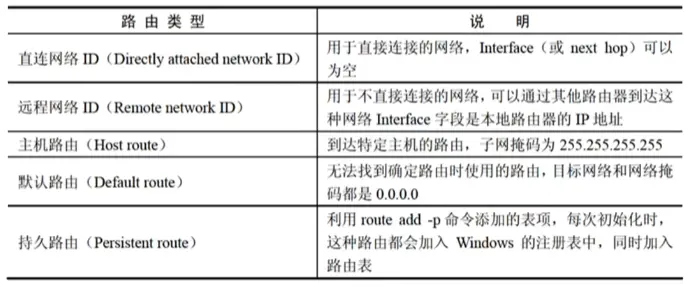
Windows Server 2003 has 5 routing types. When a Windows server receives an IP packet, it first looks for host routes, then network routes (direct and remote), and if those fail, it finally looks for a default route.
Administrative distances for various route sources are as follows:
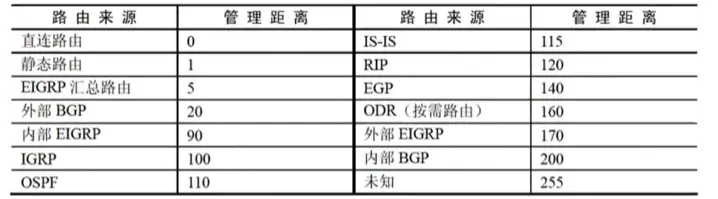
If a router receives multiple routes for a certain destination, forwarded by different routing protocols, it compares their administrative distances and uses the route information from the source with the smallest administrative distance.