Elasticsearch Series
Content Link Elasticsearch Basic Operations https://blog.yexca.net/en/archives/226 Elasticsearch Query Operations https://blog.yexca.net/en/archives/227 RestClient Basic Operations https://blog.yexca.net/en/archives/228 RestClient Query Operations https://blog.yexca.net/en/archives/229 Elasticsearch Data Aggregation https://blog.yexca.net/en/archives/231 Elasticsearch Autocomplete https://blog.yexca.net/en/archives/232 Elasticsearch Data Sync https://blog.yexca.net/en/archives/234 Elasticsearch Cluster This Article
A standalone ES setup for data storage inevitably faces two issues: massive data storage and single point of failure.
- Massive data storage: Logically split the index into N shards, storing them across multiple nodes.
- Single point of failure: Back up shard data on different nodes (replicas).
ES Cluster Concepts
Cluster: A group of nodes sharing a common
cluster name.Node: An ES instance within the cluster.
Shard: An index can be split into different parts for storage, called shards. In a clustered environment, different shards of an index can be distributed across various nodes.
- Solves: The problem of too much data for a single point of storage.
- Shards are similar to HDFS where data is split and backed up multiple times.
Primary shard: Defined in relation to replica shards.
Replica shard: Each primary shard can have one or more replicas, holding the same data as the primary.
Setting up an ES Cluster
This can be done using docker-compose.
| |
ES requires some Linux system permission modifications. Edit the /etc/sysctl.conf file.
| |
Add the following content:
| |
Then execute the command to apply the configuration:
| |
Start the cluster using docker-compose:
| |
Monitoring Cluster Status
Kibana can monitor ES clusters, but it relies on ES’s X-Pack feature, which makes configuration complex.
You can use Cerebro to monitor ES clusters. Github: https://github.com/lmenezes/cerebro
After running bin/cerebro.bat, access
http://localhost:9000
to enter the management interface.
Cerebro allows for visual index creation. Below is a DSL example for creation:
| |
Cluster Role Assignment
Nodes in an ES cluster have different roles.
| Node Type | Config Parameter | Default Value | Node Responsibilities |
|---|---|---|---|
| Master-eligible | node.master | true | Can manage and record cluster state, determine shard allocation, and handle index creation/deletion requests. |
| Data | node.data | true | Stores data, handles search, aggregation, and CRUD operations. |
| Ingest | node.ingest | true | Pre-processing data before storage. |
| Coordinating | If all 3 parameters above are false, it’s a coordinating node. | None | Routes requests to other nodes, combines results from other nodes, and returns them to the user. |
By default, any node in the cluster possesses all four roles simultaneously.
However, in a real cluster, it’s crucial to separate node roles.
- Master node: High CPU requirements, but low memory requirements.
- Data node: High CPU and memory requirements.
- Coordinating node: High network bandwidth and CPU requirements.
Role separation allows us to allocate different hardware based on node requirements and prevents interference between different responsibilities.
Cluster Split-Brain Issue
Split-brain occurs due to network isolation between nodes in a cluster.
Assume a three-node cluster where the master node (node1) loses connection with other nodes (network partition). Node2 and Node3 will deem node1 as down and initiate a new master election. If node3 gets elected, the cluster continues serving requests. Node2 and Node3 form their own cluster, while node1 forms its own. Data desynchronization occurs, leading to data discrepancies.
When the network partition resolves, with two master nodes existing, the cluster state becomes inconsistent, resulting in a split-brain scenario.
Solution: A node needs more than (number of eligible nodes + 1) / 2 votes to be elected as master. Therefore, an odd number of eligible nodes is recommended. The corresponding configuration is discovery.zen.minimum_master_nodes, which became the default in ES 7.0+, so split-brain issues are generally less common now.
For instance, in the three-node cluster above, a node needs more than (3+1)/2 = 2 votes. Node3 receives votes from Node2 and Node3, becoming the master. Node1 only gets its own vote and isn’t elected. The cluster still has only one master, avoiding split-brain.
Cluster Distributed Storage
When adding a new document, it should be saved to different shards to ensure data balance. So, how does the coordinating node determine which shard the data should be stored in?
ES uses a hash algorithm to calculate which shard a document should be stored in.
Formula: shard = hash(_routing) % number_of_shards
Explanation:
_routingdefaults to the document’s ID.- The algorithm depends on the number of shards, so once an index is created, the shard count cannot be changed.
New Document Flow:
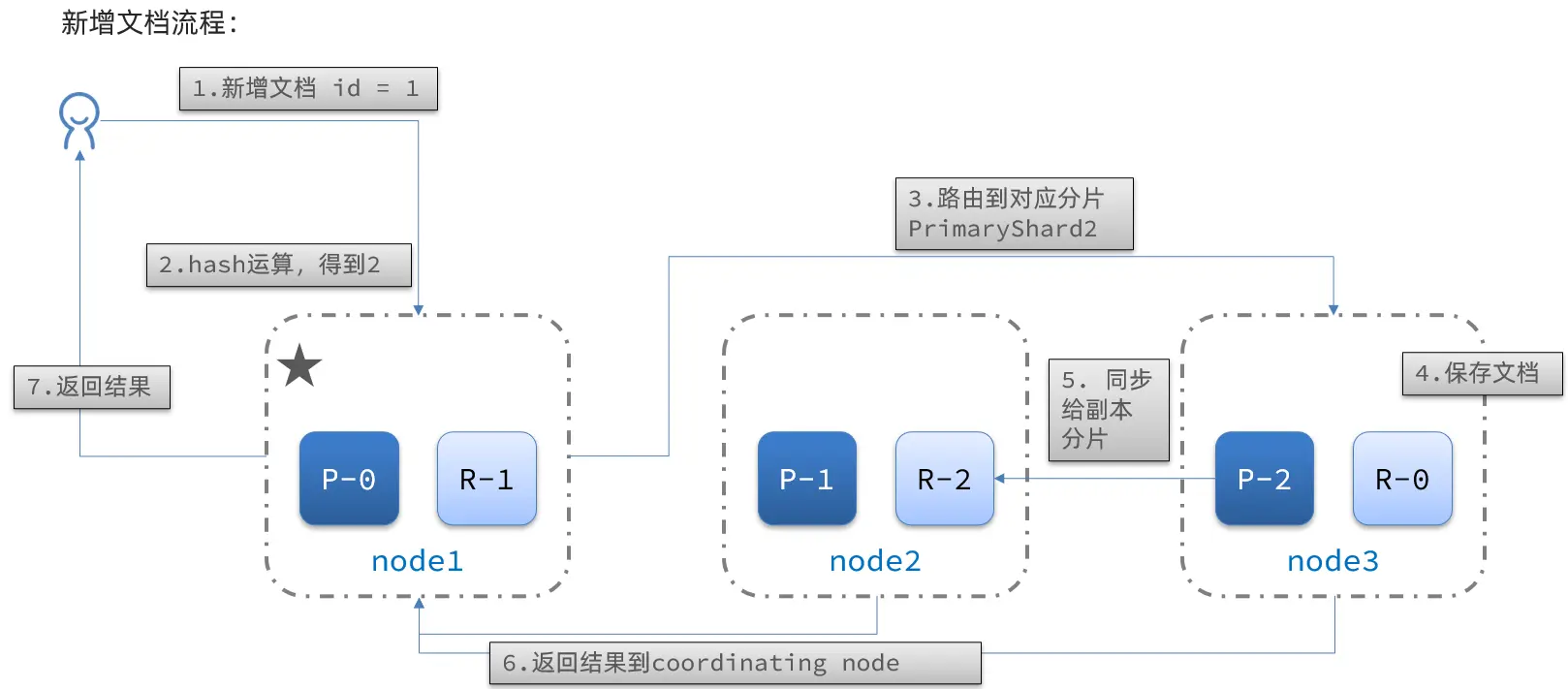
Flow:
- Add a document with
id = 1. - Perform a hash operation on the ID. If the result is 2, it’s stored in shard-2.
- The primary shard for shard-2 is on node3, so the data is routed to node3.
- Save the document.
- Synchronize with shard-2’s replica-2 on node2.
- Return the result to the coordinating-node.
Cluster Distributed Queries
ES queries are divided into two phases:
- Scatter phase: The coordinating node distributes the request to every shard.
- Gather phase: The coordinating node aggregates search results from data nodes, processes them into a final result set, and returns it to the user.
Cluster Fault Tolerance
The cluster’s master node monitors the status of nodes. If a node fails, it immediately migrates the failed node’s shard data to other nodes to ensure data safety. This is known as fault tolerance.
Assume a three-node cluster where node1 is the master.
- Node1 goes down.
- A new master election is needed. Assume node2 is elected.
- After node2 becomes the master, it checks the cluster status. Discovering that node1’s shards have no replica nodes, it needs to migrate the data from node1 to node2 and node3.