Redis Basics: https://blog.yexca.net/en/archives/157/
Redis Distributed Caching: This article
Introduction
So I wrote both articles at the same time but waited a year to post them, huh?
Actually, I had three articles planned back then, but every time I sat down to finish them, I forgot what I wanted to say. A year just flew by…
Problems
A standalone Redis instance has several issues:
- Data loss: Solution: Implement Redis persistence.
- Concurrency limits: Solution: Set up Master-Slave clusters for read/write splitting.
- Storage limits: Solution: Set up Sharded clusters using slot mechanisms for dynamic scaling.
- Fault recovery: Solution: Use Redis Sentinel for health monitoring and automatic recovery.
Redis Persistence
Redis offers two persistence options: RDB and AOF.
RDB Persistence
RDB stands for Redis Database Backup file, also known as a data snapshot. Simply put, it saves all memory data to disk. After a crash, Redis restores data by reading the snapshot file. These snapshots (RDB files) are saved in the working directory by default.
RDB executes in these four scenarios:
savecommand: Immediate execution. Blocks the main process and all other commands. Use only during data migration.bgsavecommand: Asynchronous execution. Forks a child process to handle the RDB, allowing the main process to keep processing requests.- Shutdown: Redis automatically runs a
savecommand when stopping. - Trigger conditions: Configured in the settings as follows:
| |
Other configurations:
| |
RDB Principles
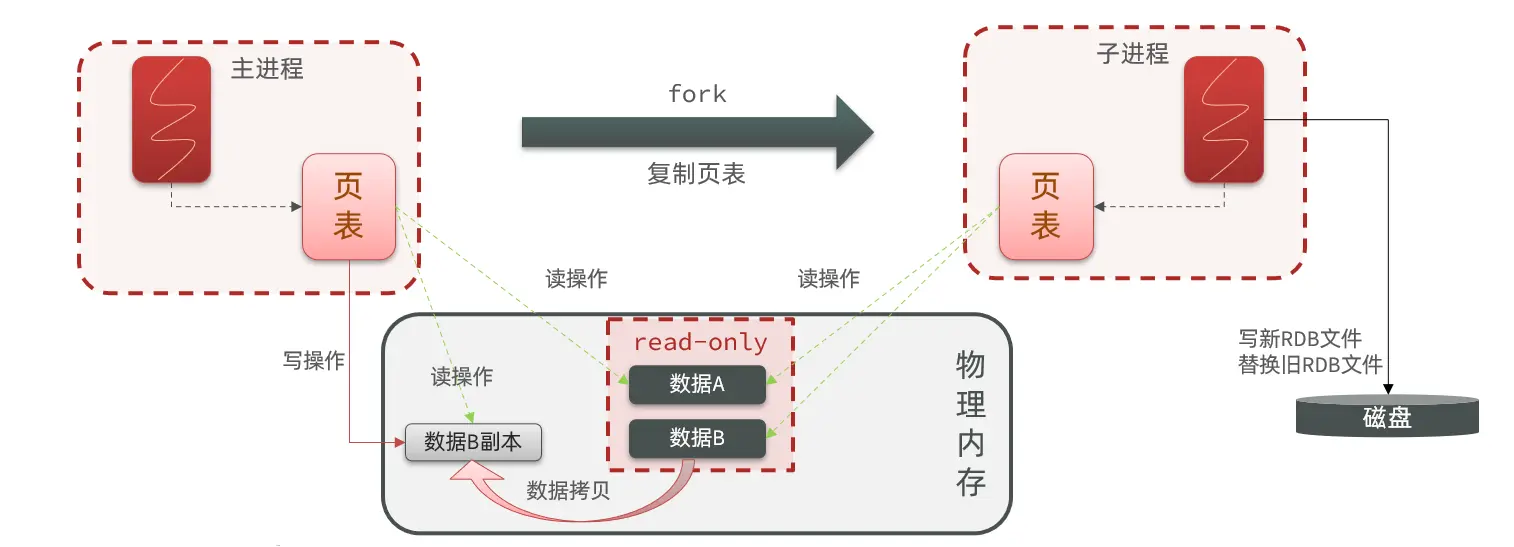
When bgsave starts, it forks the main process to create a child process. Both share the same memory data. Once the fork is complete, the child process reads the memory and writes it to the RDB file.
Forking uses Copy-On-Write (COW) technology:
- When the main process performs a read, it accesses the shared memory.
- When the main process performs a write, it copies the data segment first and then executes the write.
RDB Disadvantages:
- Long intervals between saves; data written between two RDB runs risks being lost.
- Forking, compression, and writing RDB files are resource-heavy.
AOF Persistence
AOF stands for Append Only File. Every write command processed by Redis is logged in the AOF file. Think of it as a command history log.
AOF is disabled by default. Enable it in the config:
| |
The logging frequency can also be configured in redis.conf:
| |
Comparison of sync policies:
| Option | Flush Timing | Pros | Cons |
|---|---|---|---|
| always | Sync flush | High reliability, minimal loss | High performance impact |
| everysec | Per-second flush | Balanced performance | Max 1s data loss |
| no | OS controlled | Best performance | Low reliability, potential high loss |
File Rewriting
Since AOF logs every command, files grow much larger than RDB files. Also, AOF might log multiple writes to the same key, though only the last state matters. Running the bgrewriteaof command rewrites the AOF file using the minimum number of commands required to reach the current state.
Example: Original commands:
| |
After rewrite:
| |
Redis also triggers auto-rewrites based on thresholds in the config:
| |
RDB vs AOF
RDB and AOF both have pros and cons. For high data security, developers often use both together.
| RDB | AOF | |
|---|---|---|
| Persistence Method | Periodic full memory snapshots | Logs every write command |
| Data Integrity | Incomplete; data lost between backups | Mostly complete, depends on flush policy |
| File Size | Compressed, small | Command logs, very large |
| Recovery Speed | Very fast | Slow |
| Recovery Priority | Low (due to integrity) | High (due to better integrity) |
| Resource Usage | High CPU/Memory during fork | Low (mostly Disk I/O). Note: Rewrite uses significant CPU/RAM. |
| Use Case | Tolerable data loss (minutes), fast startup | High data security requirements |
Redis Master-Slave Architecture
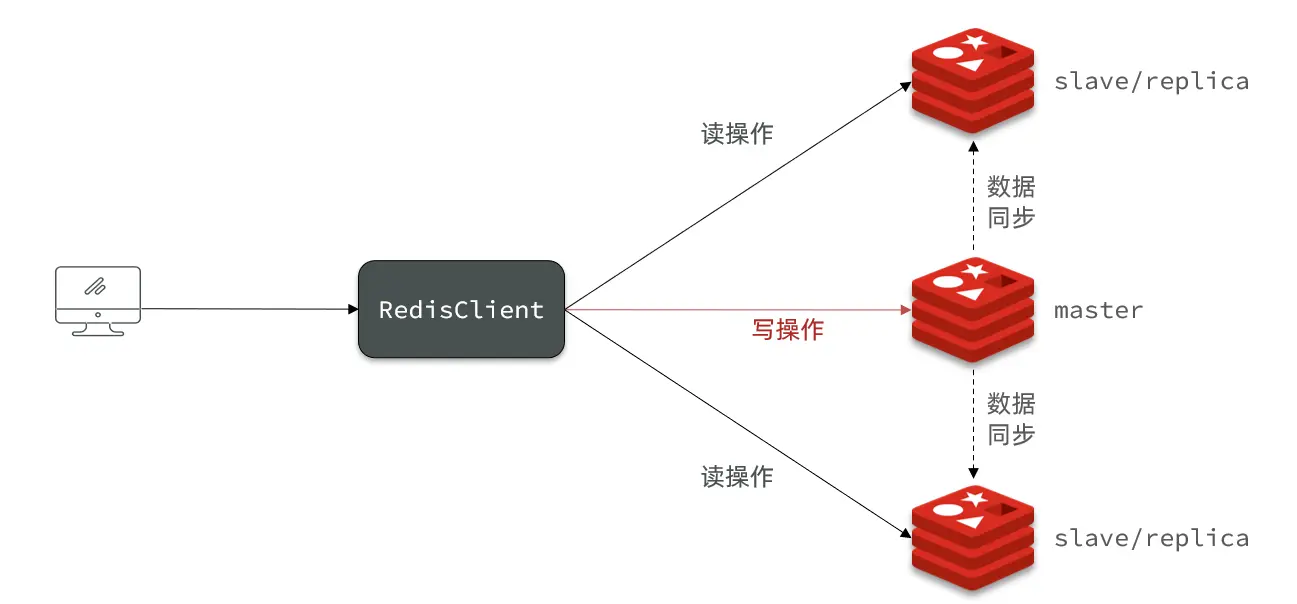
A single Redis node has a concurrency ceiling. To scale, you need a Master-Slave cluster to implement read/write splitting.
Setting up the Cluster
Environment: CentOS 7
Based on the diagram, we’ll deploy three nodes on one machine using ports 7001 (master), 7002, and 7003.
First, create the directories:
| |
If you previously modified the config, revert to default RDB mode:
| |
Copy the config file to each instance directory:
| |
Modify the port and working directory for each instance (updates port and RDB save path):
| |
Update the IP for each directory (replace ip_address with actual IP):
| |
Start the instances:
| |
Stop the instances:
| |