📢 This article was translated by gemini-2.5-flash
Composite Pattern (Object Structural Pattern)
Intent
Combine objects into tree structures to represent part-whole hierarchies. Composite lets clients treat individual objects and compositions of objects uniformly.
Structure
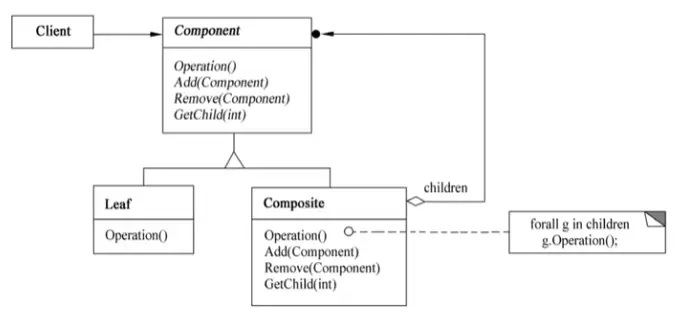
Here:
- Component declares an interface for objects in the composition; implements default behavior for the interface common to all classes where appropriate; declares an interface for accessing and managing Component’s children; (optional) defines an interface for accessing a parent component in the recursive structure and implements it where appropriate.
- Leaf represents leaf objects in the composition, which have no children; defines the behavior of primitive objects in the composition.
- Composite defines behavior for components having children; stores child components; implements child-related operations in the Component interface.
- Client manipulates objects in the composition through the Component interface.
Applicability
The Composite pattern is useful when:
- You want to represent part-whole hierarchies of objects.
- You want clients to ignore the difference between individual objects and compositions of objects. Clients will treat all objects in the composite structure uniformly.
Example 1
A company’s organizational chart is shown below:
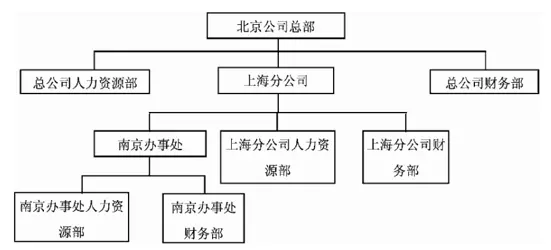
Now, using the Composite design pattern to build the company’s organizational structure, we get the class diagram below:
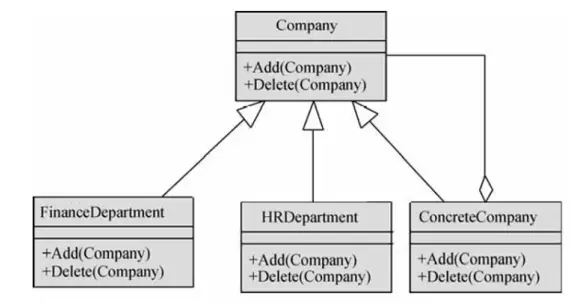
Here, Company is an abstract class, defining interfaces for Add and Delete methods for branches/offices or departments in the organizational chart. The ConcreteCompany class represents specific branches or offices, which can have different departments. HRDepartment and FinanceDepartment classes represent the Human Resources Department and Finance Department, respectively.
 1
 2
 3
 4
 5
 6
 7
 8
 9
10
11
12
13
14
15
16
17
18
19
20
21
22
23
24
25
26
27
28
29
30
31
32
33
34
35
36
37
38
39
40
41
42
43
44
| import java.util.*;
abstract class Company {
protected String name;
public Company(String name) { this.name = name; }
public abstract void Add(Company c); // Add subsidiary, office, or department
public abstract void Delete(Company c); // Delete subsidiary, office, or department
}
class ConcreteCompany extends Company {
private List<Company> children = new ArrayList<Company>();
// Store subsidiaries, offices, or departments
public ConcreteCompany(String name) { super(name); }
public void Add(Company c) {children.add(c); }
public void Delete(Company c) {children.remove(c); }
}
class HRDepartment extends Company {
public HRDepartment(String name) { super(name); }
// Other code omitted
}
class FinanceDepartment extends Company {
public FinanceDepartment(String name) { super(name); }
// Other code omitted
}
public class Test {
public static void main(String[] args) {
ConcreteCompany root = new ConcreteCompany("Beijing Head Office");
root.Add(new HRDepartment("Head Office HR Department"));
root.Add(new FinanceDepartment("Head Office Finance Department"));
ConcreteCompany comp = new ConcreteCompany("Shanghai Branch");
comp.Add(new HRDepartment("Shanghai Branch HR Department"));
comp.Add(new FinanceDepartment("Shanghai Branch Finance Department"));
root.Add(comp);
ConcreteCompany comp1 = new ConcreteCompany("Nanjing Office");
comp1.Add(new HRDepartment("Nanjing Office HR Department"));
comp1.Add(new FinanceDepartment("Nanjing Office Finance Department"));
comp.Add(comp1); // Other code omitted
}
}
|
Example 2
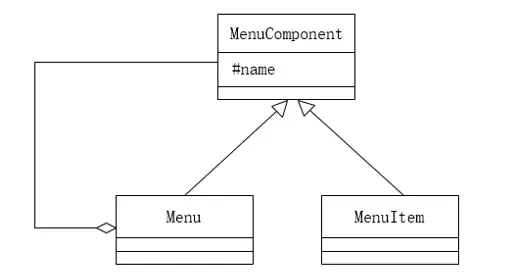
Cascading menus are a common way to organize system functions in window-style software. A cascading menu can contain a menu item (directly corresponding to a specific function) or a sub-menu. We’ll now use the Composite design pattern to implement a cascading menu, resulting in the class diagram below:
 1
 2
 3
 4
 5
 6
 7
 8
 9
10
11
12
13
14
15
16
17
18
19
20
21
22
23
24
25
26
27
28
29
30
31
32
33
34
35
36
37
38
39
40
41
42
43
44
45
46
47
48
49
50
51
52
53
| import java.util.*;
abstract class MenuComponent { // Elements forming the cascading menu
protected String name; // Menu item or sub-menu name
public void printName() { System.out.println(name); }
public abstract boolean addMenuElement(MenuComponent element) ;
public abstract boolean removeMenuElement(MenuComponent element);
public abstract List<MenuComponent> getElement();
}
class MenuItem extends MenuComponent {
public MenuItem(String name) { this.name=name; }
public boolean addMenuElement(MenuComponent element) { return false; }
public boolean removeMenuElement(MenuComponent element) {
return false;
}
public List<MenuComponent> getElement(){ return null; }
}
class Menu extends MemuComponent {
private List<MenuComponent> elementsList;
public Menu(String name) {
this.name = name;
this.elementList = new ArrayList<MenuComponent>;
}
public boolean addMenuElement(MenuComponent element) {
return elementList.add(element);
}
public boolean removeMenuElement(MenuComponent element) {
return elementList.remove(element);
}
public List<MenuComponent> getElement() { return elementList; }
}
class CompositeTest {
public static void main(String[] args) {
MenuComponent mainMenu = new Menu("Insert");
MenuComponent subMenu = new Menu("Chart");
MenuComponent element = new MenuItem("On This Sheet");
mainMenu.addMenuElement(subMenu);
subMenu.addMenuElement(element);
printMenus(mainMenu);
}
private static void printMenus(MenuComponent ifile) {
ifile.printName();
List<MenuComponent> children = ifile.getElement();
if (children == null) return;
for(MenuComponent element; children) {
printMenus(element);
}
}
}
|
Example 3
 1
 2
 3
 4
 5
 6
 7
 8
 9
10
11
12
13
14
15
16
17
18
19
20
21
22
23
24
25
26
27
28
29
30
31
32
33
34
35
36
37
38
39
40
41
42
43
44
45
46
47
48
49
50
51
52
53
54
55
56
57
58
59
60
61
62
63
64
65
66
67
68
69
70
71
72
73
74
75
76
77
78
79
80
81
82
83
84
85
86
87
88
89
90
91
92
93
94
95
96
97
| import java.util.*;
public class CompositePattern {
public static void main(String[] args) {
AbstractFile root = new Folder("root");
AbstractFile bin = new Folder("bin");
AbstractFile tmp = new Folder("tmp");
AbstractFile file = new File("file");
root.Add(bin);
bin.Add(tmp);
root.Add(file);
// root.Remove(tmp);
print(root);
}
static void print(AbstractFile file){
List<AbstractFile> lf = file.GetChildren();
file.Operation();
// More concise way
// if(lf == null) return;
// for(AbstractFile i : lf) print(i);
if (lf != null) {
for (AbstractFile i : lf) {
if (i != null) {
print(i);
}
else
return;
}
}
else
return;
}
}
abstract class AbstractFile{
protected String name;
public void Operation(){
System.out.println(name);
}
public abstract boolean Add(AbstractFile af);
public abstract boolean Remove(AbstractFile af);
public abstract List<AbstractFile> GetChildren();
}
class Folder extends AbstractFile{
private List<AbstractFile> childrenList = new ArrayList<>();
public Folder(String name){
this.name = name;
}
@Override
public boolean Add(AbstractFile af){
return childrenList.add(af);
}
@Override
public boolean Remove(AbstractFile af){
return childrenList.remove(af);
}
@Override
public List<AbstractFile> GetChildren(){
return this.childrenList;
}
}
class File extends AbstractFile{
public File(String name){
this.name = name;
}
@Override
public boolean Add(AbstractFile af){
System.out.println("Forbidden");
return false;
}
@Override
public boolean Remove(AbstractFile af){
System.out.println("Forbidden");
return false;
}
@Override
public List<AbstractFile> GetChildren(){
return null;
}
}
|